
1 A technical proposal, separate from dates and tax entitlement
The proposal compares available technical information with the A/B and IV/V catalogues and cites its source evidence. It may be possible even when the dates needed to determine fiscal competence are missing. It does not choose the scheme, fill missing dates or establish entitlement: the related HOLD states remain to be resolved separately.
An asset name, model or nameplate year alone does not establish a catalogue function. When the material is insufficient, the app must show that state and the available explanation. A proposal is not a full O1–O5/RU assessment, final appraisal or approval by the software provider.
2 From nameplate capture to saved asset data: automation in Essential mode too
- Choose a configured, compatible AI engine, with authorised accounts and active access entitlement. Check which recipients will receive data through the selected route.
- Capture the nameplate and let AI finish reading its visible information, or open Asset data, complete the technical information and save. Nameplate reading and the classification proposal are separate tasks.
- The new technical classification is scheduled automatically, including in Essential mode: pressing a button is not required. A short 2-second interval after the last relevant change groups closely spaced updates before the request; it does not promise a response within 2 seconds. Network, evidence reading and model processing have separate timings.
- When a usable response for the current sources arrives, the working profile and evidence groups update even while the camera or asset editor is already open. Closing and reopening them is unnecessary. The result does not replace a prevailing human choice or erase information you are editing.
A nameplate does not always establish the asset’s function: name, model, serial number and year may be insufficient to distinguish catalogue entries. If insufficient data or a request for information appears, add the process description, actual function, manual and relevant evidence; do not invent information to remove the warning. Saving new material can trigger automatic recalculation.
This automation concerns the technical classification proposal. In Essential mode, full requirements assessment, documentary research and alert review retain their own commands. The app does not configure accounts, authorise new recipients, include API charges or determine dates, a tax scheme or entitlement. Test the route with DEMO data before real use.
3 Read the result, review conflicts and explicitly request another attempt
In Asset data, read the entry, reasoning and cited evidence. When no human choice takes precedence, the current technical proposal can update the working profile used to organise evidence collection. This update is not an approved professional classification: compare the proposal with the catalogue wording, actual function and original records before using the appraisal.
An entry chosen or confirmed by the professional takes precedence. If the new analysis proposes an entry incompatible with that human choice, the disagreement requires review; it is not resolved by automatically overwriting the professional’s entry. Read the reasoning and deliberately confirm or correct it. No AI response alone establishes tax eligibility.
Insufficient results and errors must not cause endless retries on the same source revision. Capturing more information or saving a relevant change can schedule another proposal; Retry AI classification remains an optional command for an explicit retry when needed. The button is disabled while a classification request is active. Requests may consume resources or credits and remain separate from the full requirements assessment.
A response based on superseded sources must not drive the current profile. Its historical copy remains preserved. Dates, fiscal competence and their HOLD states have a separate check: neither a nameplate reading nor a catalogue proposal automatically fills missing dates or approves entitlement.
4 The specific Apple Intelligence and local-model limitation
This task uses the complete catalogues. Classification through Apple Intelligence is disabled because it has no verified context budget for that material; the app reports the limit instead of guessing an entry. Other local functions, including nameplate reading and photo assessment, retain their own requirements and routes; their operation does not establish availability of this task.
A downloaded MLX model can be used for the proposal only when its configuration, context and tokenisation pass the required checks. Downloading it alone is insufficient. If the check fails, select an authorised and configured API or Codex Cloud route and repeat a DEMO test. This page does not attest successful real-provider requests, performance or absence of charges.
5 The A.2.2 example and output-data evidence
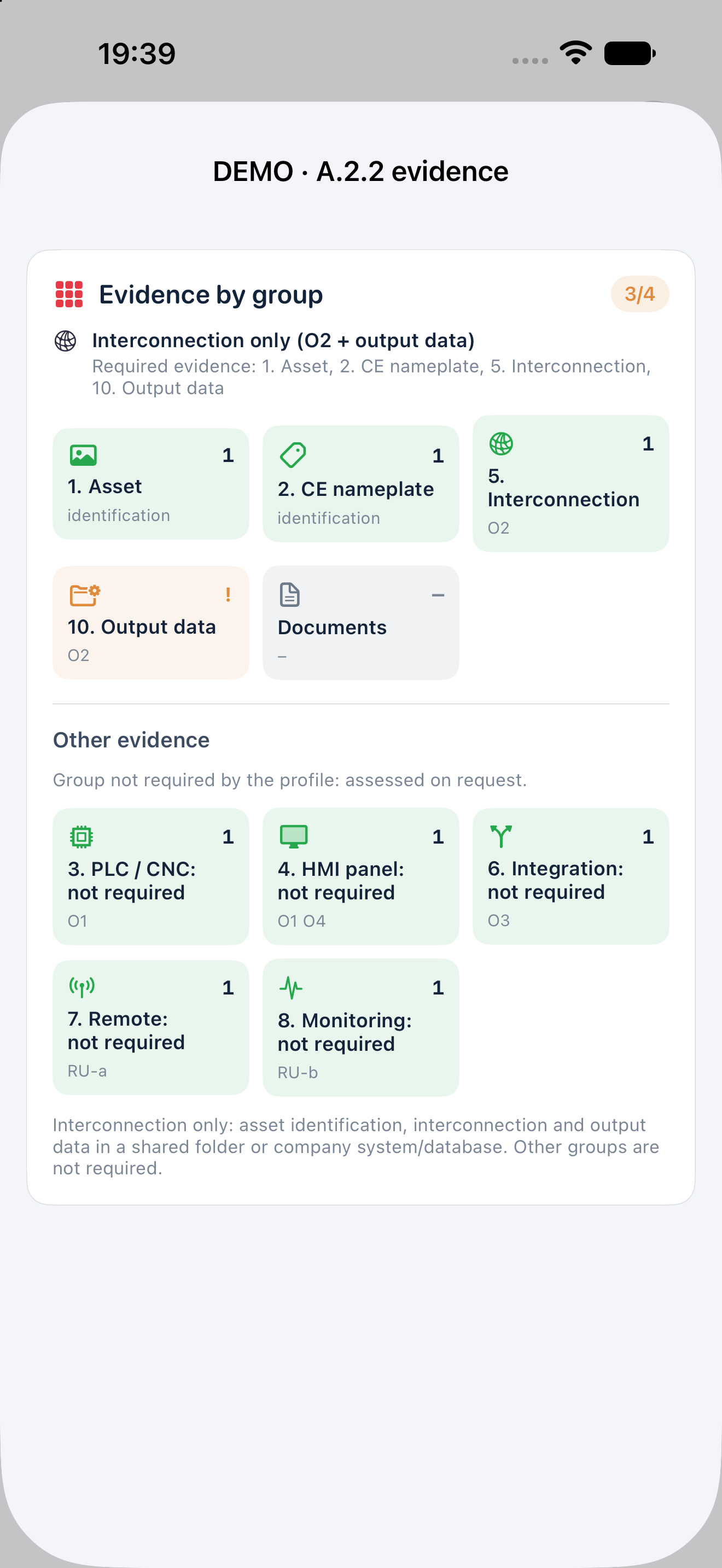
For A.2.2, the technical profile concerns O2 interconnection and the entry’s functional characteristics: in-process quality monitoring, documented process qualification and connection to the factory information system. All first-group 5+2 requirements do not automatically apply. The professional must establish the actual function and fit to the entry, as well as interconnection.
Document relevant output data, such as measurement, test or production reports stored in a shared folder or a company system or database, attributable to the asset and process. The group is now named Output data (Shared folder in the Rev05 guides and earlier screens). A folder is one possible destination alongside a company system or database, rather than a universally exclusive legal storage format. A ping, an empty directory or a favourable O2 alone does not establish tax eligibility or a complete appraisal.
6 Earlier archives and the guides to retain
Update the same app without uninstalling it, after checking an external backup. Migration preserves data, identifiers, photos, documents and historical outputs; it does not invent a scheme or dates. Groups outside the current profile remain accessible under Other evidence and are labelled not required. Do not delete them to make coverage appear correct.
After classification, profile, date or other technical-input changes, the previous assessment may be marked for update; saved text and revisions remain preserved. The Rev05 PDFs retain their reviewed bytes. The guides are available in PDF and HTML, including in the ZIP package. Read this addendum before AI setup and always check the build actually installed.