StopTime app icon
iPhone · iOS 17 or later
Available on App Store

StopTimeStopping time and
safety distances.

From video to test data, on your iPhone. Analyse the events, review uncertainty and calculate distances for the cases supported by EN ISO 13855.

Base from EUR 3.99/month. Single reports: EUR 19.00. Unlimited from EUR 23.90/month. Auto-renewable subscriptions. Italian App Store prices.

Results and draft technical reports require verification. StopTime is not a calibrated instrument and does not certify a machine.

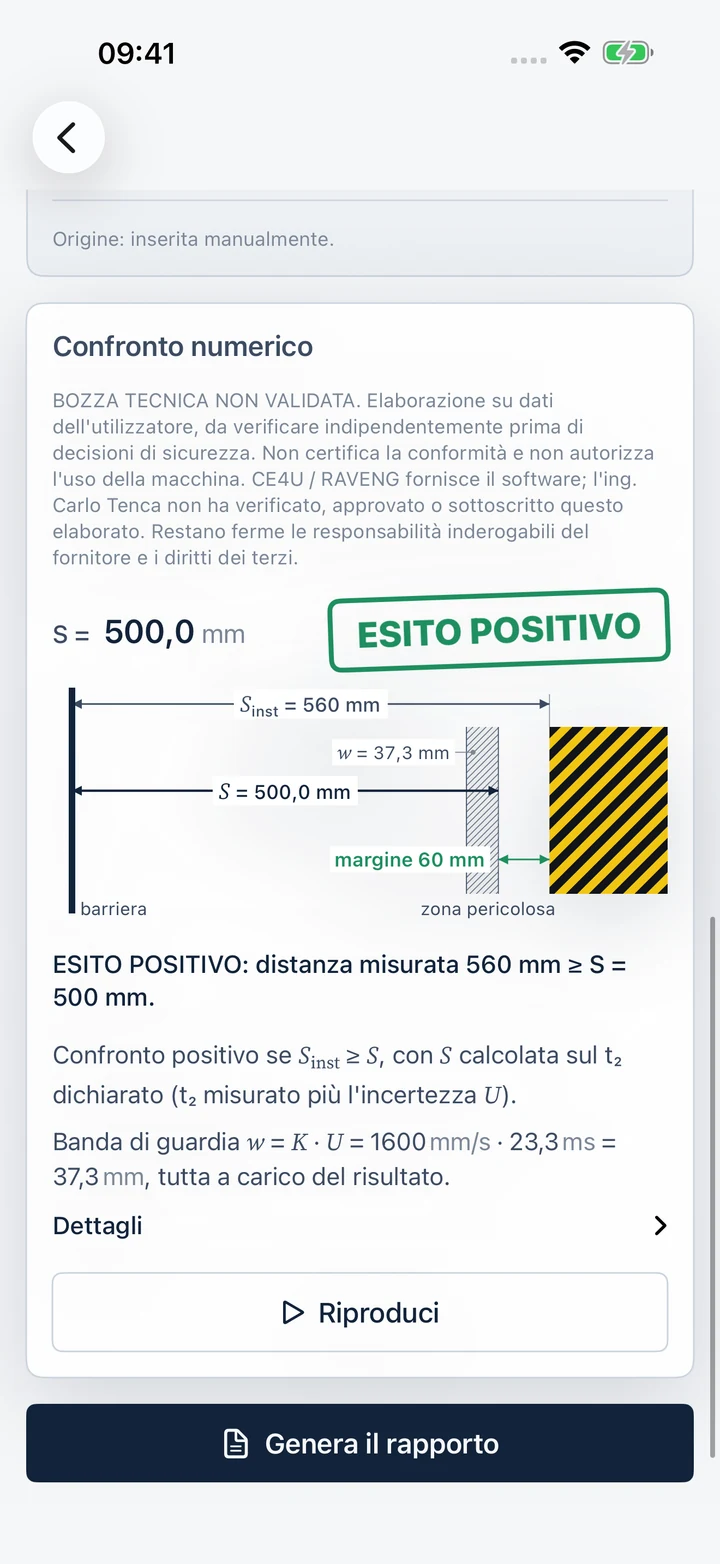
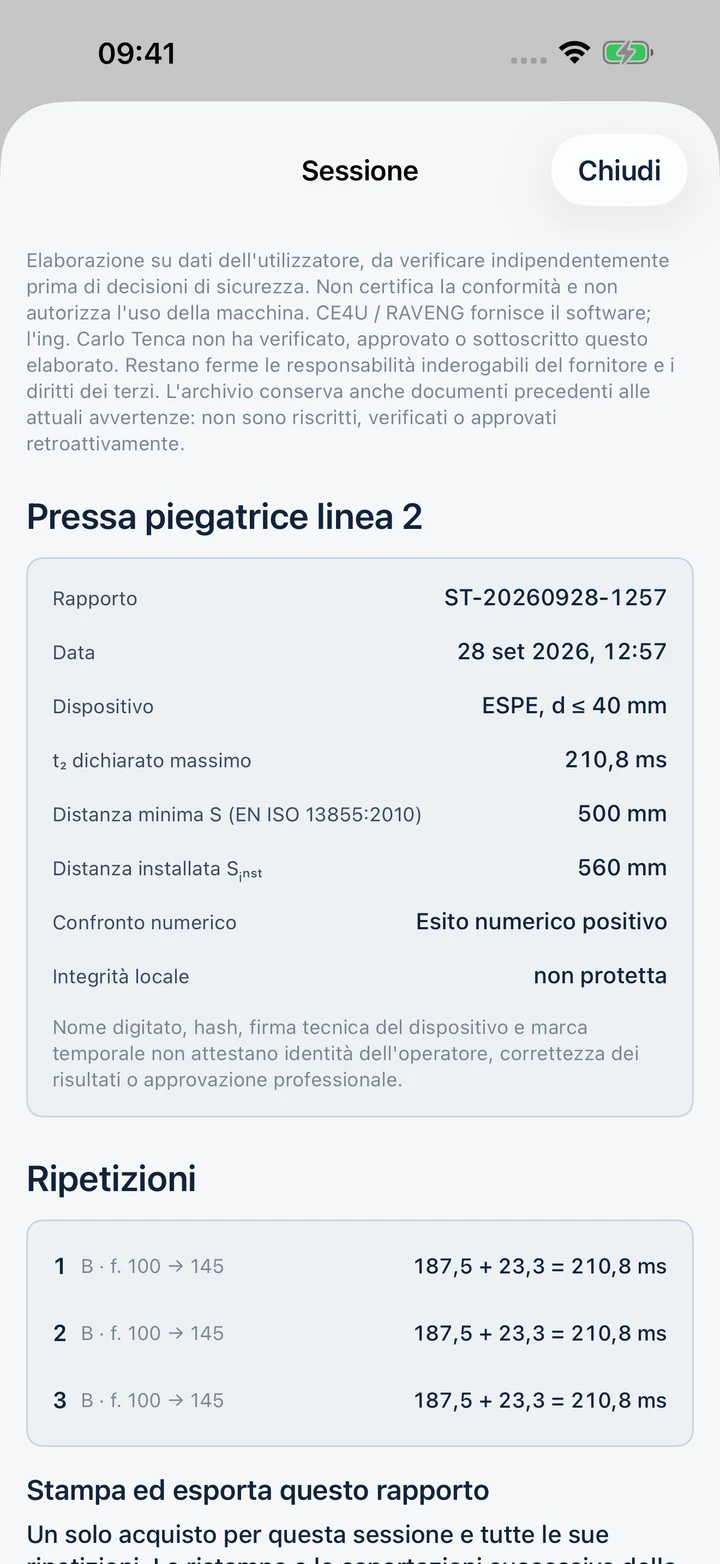
StopTime: example of safety distance comparison, positive numerical margin and warnings (Italian interface shown)
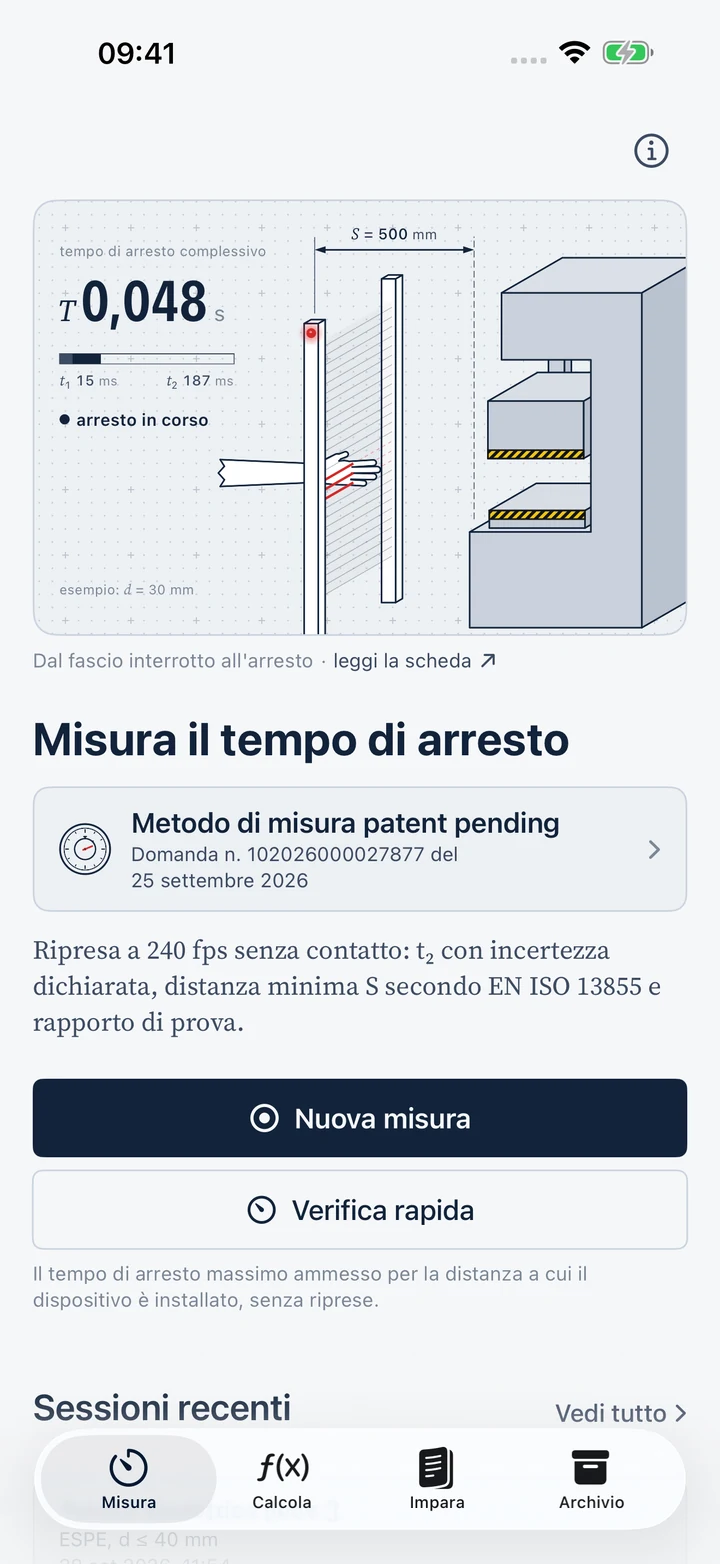
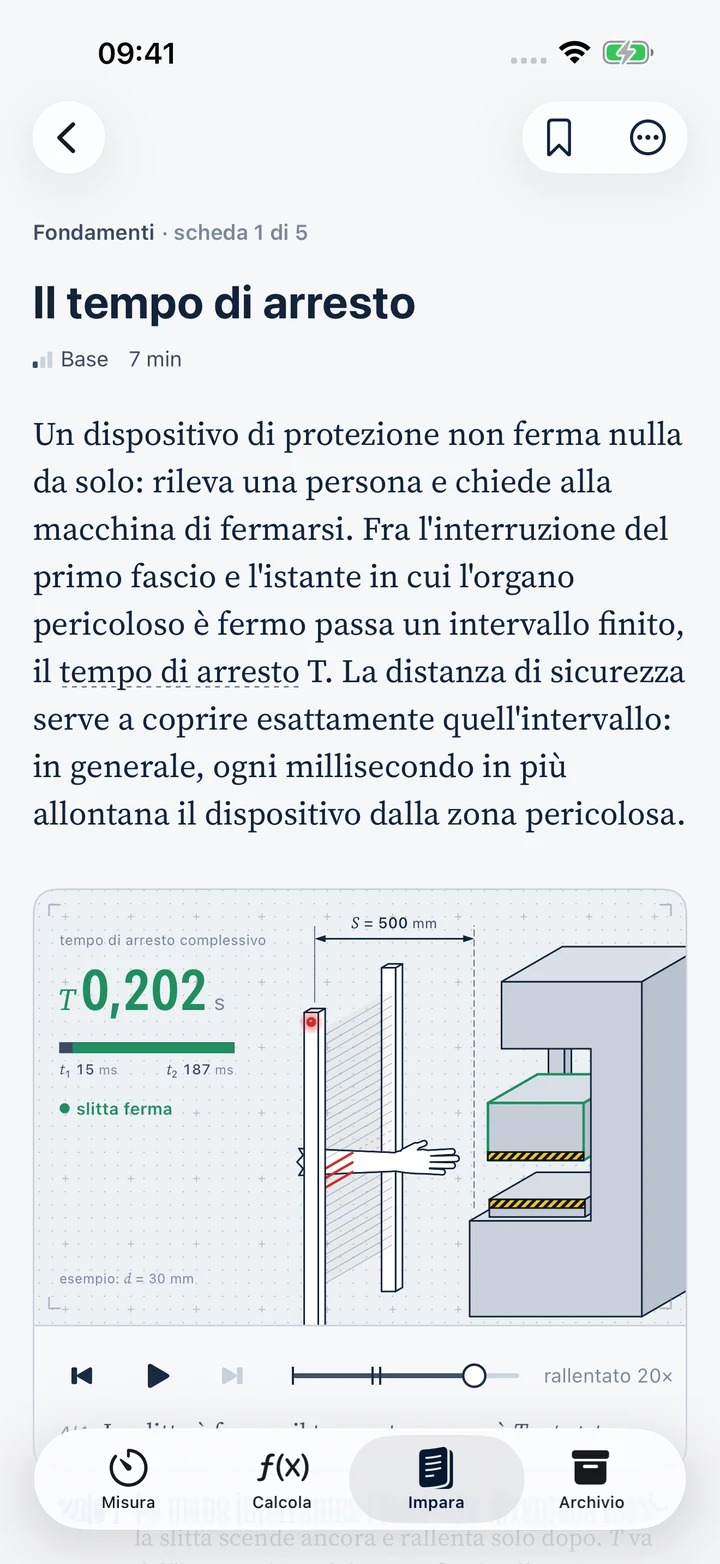
StopTime Measure screen, with the animated diagram of total stopping time T (Italian interface shown)
240fps
High-frequency recording with synchronised audio
4.17ms
duration of a frame at 240 fps, not guaranteed accuracy
10
tools for distances, measurement and kinematics
29
articles with 25 interactive animated diagrams

Version 1.1.0 adds English: Italian is selected automatically when the iPhone's primary language is Italian; English is used for every other language. You can change this in setup or About > Settings > Language. This update is being prepared for App Store review. The screenshots shown here are from the released Italian version.

The problem

Machine stopping time: why measure it?

A photoelectric light curtain, pressure-sensitive mat or two-hand control provides protection only when installed far enough from the hazard zone: a person must not reach the hazard before the machine stops. EN ISO 13855 relates this distance to the total stopping time of the system.

S = K · T + C · T = t1 + t2 K approach speed · C intrusion · t₁ response time of the protective device · t₂ machine stopping time

The device data sheet gives t₁. It does not give t₂, which depends on braking, load, speed and wear. Machine stopping time must be measured under the most unfavourable conditions and checked again over time. At K = 2000 mm/s, each additional millisecond means another 2 mm of distance.

The field test

  • A safe procedure, competent personnel and representative test conditions.
  • Observable reference events and suitable instruments, with the necessary metrological checks.
  • Data, conditions and limits preserved together with the result, in order to be able to recheck it.

How StopTime helps

  • Just your iPhone: no cables, no sensors on the machine and no contact with moving parts.
  • Trigger and stopping events in the same recording, on a shared timeline, frame by frame.
  • A test you can review: event frames, plots, uncertainty and calculations in the report.

How it works

From recording to report, in one workflow.

Ten guided steps cover the test: machine and device details, trigger selection, framing, recording, analysis, results, safety distance and the report. These are the key stages.

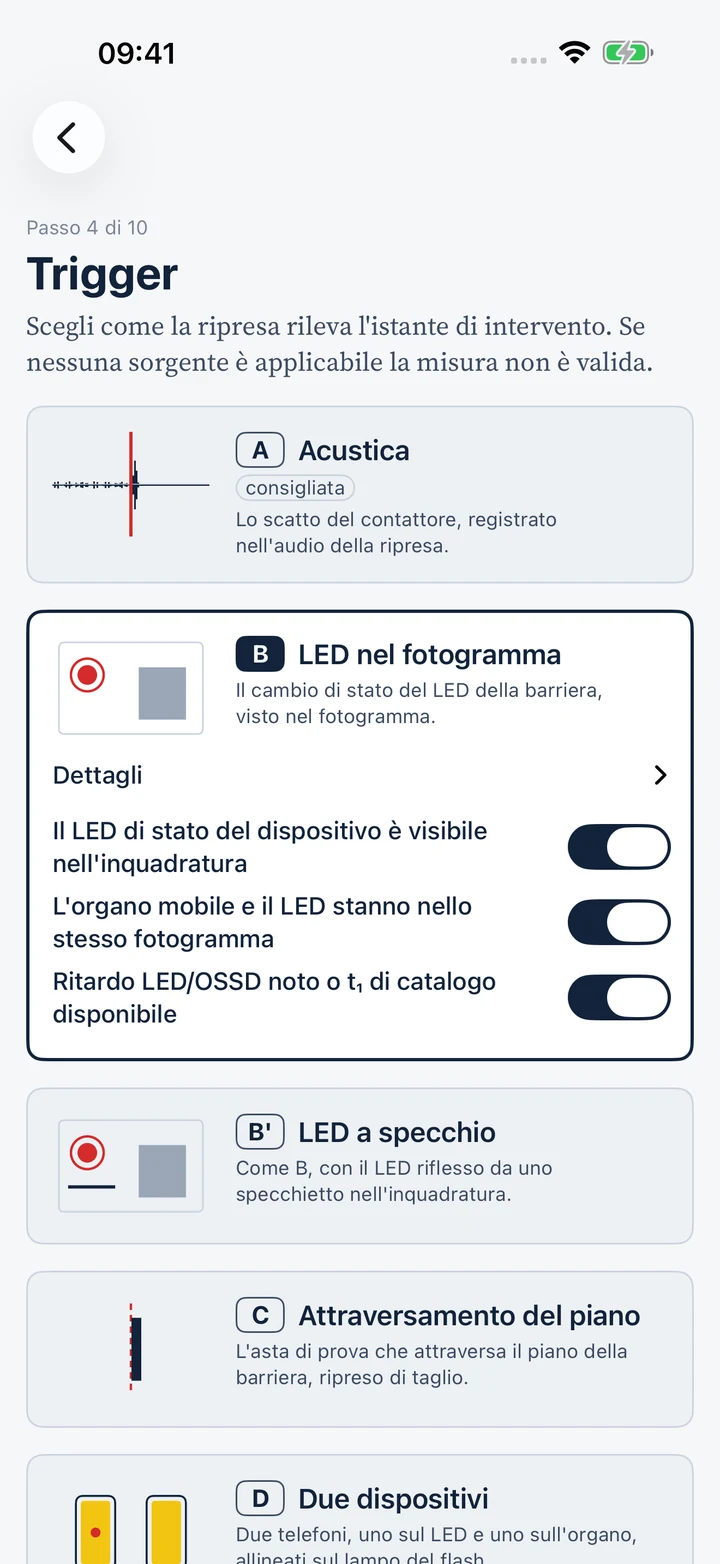
StopTime, Trigger step: choice between acoustic, LED in the frame, mirror LED and plane crossing (Italian interface shown)

Triggering instant

Four sources, one recording.

Choose an event consistent with the stopping chain and what can be observed. The operator checks whether the trigger is applicable and confirms the events.

A

Acoustic click

The relay or contactor click in the recording's audio. The phone-to-control-panel distance, entered manually or measured with LiDAR on compatible devices, is used to correct sound propagation delay.

Check the chain that commands the stop

B

LED in frame

The light curtain's LED state change, recorded together with the moving part. The delay between the LED and safety outputs must be characterised or accounted for in the uncertainty budget.

LED and moving part in the same recording

B′

Reflected LED

When the LED is outside the camera's field of view, a small mirror brings its reflection into the same frame as the moving part. Check that the state change is clearly visible.

One phone, reflected reference

C

Detection-plane crossing

The test piece crosses the detection plane, viewed edge-on by the camera. Geometry and camera angle affect identification of the event.

Use the specified test piece

The D · Two phones mode is indicated in the app as not available in this version.

Declared uncertainty

No result without uncertainty.

At 240 fps, one frame lasts 4.17 ms. The uncertainty budget accounts for event quantisation and, depending on the trigger and parameters, additional contributions such as LED-to-safety-output delay. Frame duration is not measurement accuracy.

The declared value includes calculated uncertainty; the comparison also accounts for the guard band w = K · U. Recording quality, input correctness and suitability of the method for the test still need verification. A positive numerical margin alone does not establish machine safety.

Diagram: triggering and stopping events in a recording at 240 fpsThe light curtain LED changes from green to red at frame 100. The moving part slows down and stops at frame 145. Stopping time t2 is (145 − 100) / 240 = 187.5 ms. Each event is located within plus or minus one frame, or 4.17 ms.LEDMoving-part displacement relative to its final positionFinal position90100110120130140150nnint= 100 · triggerstop · narr = 145±1 frame = ±4.17 msT2= (145 − 100) / 240 fps = 187.5 ms
DiagramThe light curtain LED changes from green to red at frame 100; the moving part stops at frame 145. The difference is 45 frames at 240 fps: 187.5 ms.
187.5ms
t₂ measured
23.3ms
U = 4.17 + 4.17 + 15.00
210.8ms
Declared t₂

Illustrative uncertainty budget: trigger quantisation, stopping-event quantisation and LED/OSSD delay, estimated here using the device's catalogue t₁ of 15 ms. The contributions are summed conservatively.

Try it here

Calculate a light curtain's safety distance.

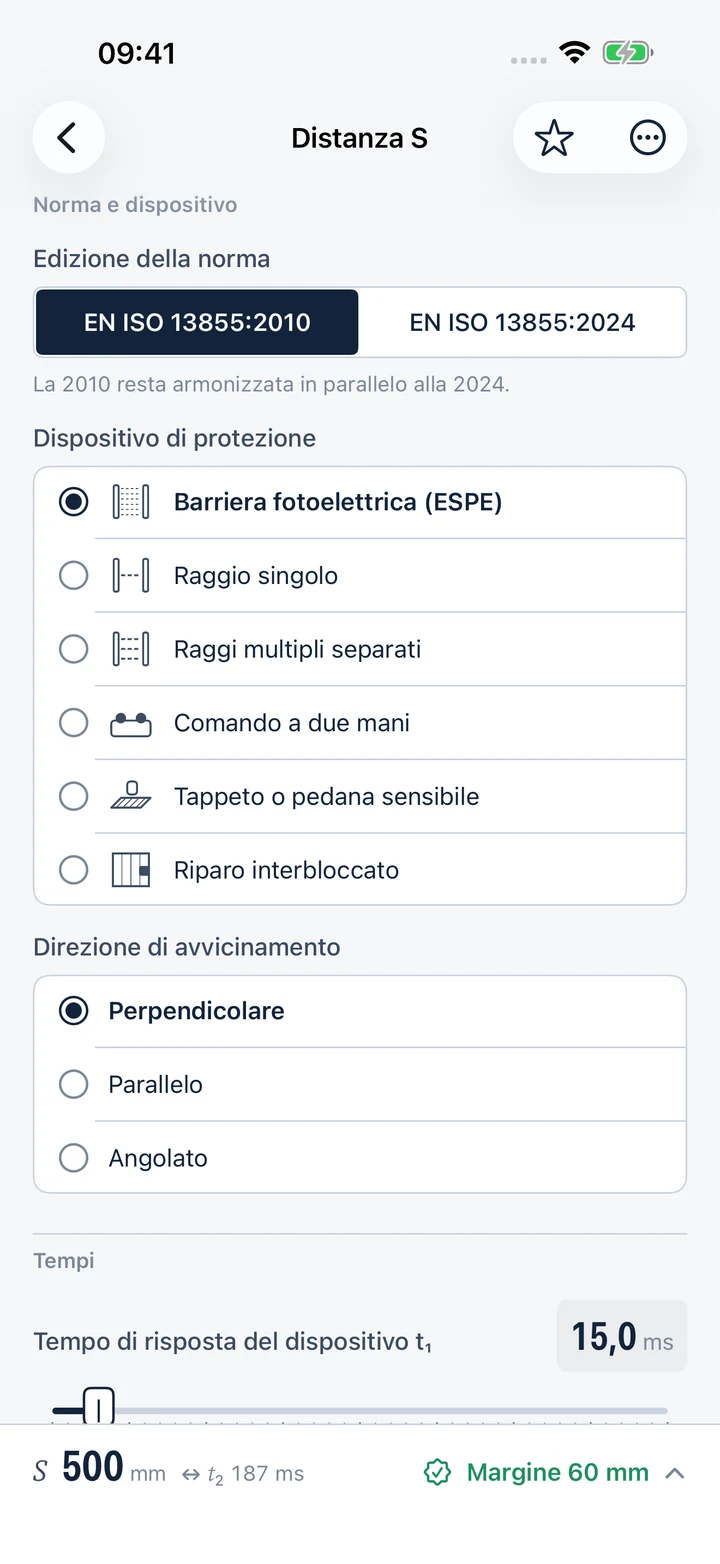
Adjust the sliders to explore how stopping time and detection capability affect the distance. This example illustrates the 2010 edition's normal-approach calculation; it is not a machine safety assessment.

mm

Light curtain detection capability: 14 mm for fingers, 30 mm for hands. Above 40 mm, a different rule applies.

ms

From the technical datasheet of the protective device.

ms

The measured value plus the uncertainty: that's what StopTime returns to you.

Minimum safety distance

500mm
Enter the installed distance
  1. T = t₁ + t₂ = 15 ms + 187 ms = 202 ms = 0.202 s
  2. K = 2000 mm/s, C = 8·(30 − 14) = 128 mm
  3. S = 2000 × 0.202 + 128 = 532 mm
  4. Recalculation: S = 1600 × 0.202 + 128 = 451.2 mm → minimum 500 mm

For these inputs, S is at the minimum of 500 mm. T can increase by approximately 30.5 ms before S increases. Demonstration for light curtains (ESPE) with normal approach under EN ISO 13855:2010; reaching over and underneath are not assessed. The app also offers 2024-edition formulas in supported cases. Normative table lookups are unavailable. This does not replace professional verification against the standard.

Calculate

Ten calculators, formulas and clear steps.

Safety distances, inverse calculations, video uncertainty and stopping kinematics. Each result shows the formula, steps and warnings, can be opened from article examples and can be exported as a PDF calculation sheet.

Formulas from the 2010 and 2024 editions of EN ISO 13855 are available with stated conditions and limits. Normative tables are not included. When a case needs tabulated data for reaching over, openings, access underneath or beam configurations, the app shows Consult the standard and does not produce an automatic distance or numerical comparison. The stopping-time measurement can still be archived. Calculate and its PDF sheets are included in Base and Unlimited.

Safety distances

Formulas and application conditions of EN ISO 13855

Minimum safety distanceS according to EN ISO 13855, editions 2010 and 2024, with numerical comparisonS = K · T + C
Allowable stopping timeThe maximum t₂ compatible with the already installed distanceK · Tmax + C = Sinst
Brake wear allowanceHow S increases when stopping performance deteriorates
Parallel approachPlane height H, allowable detection capability and intrusion distance C

Measure with the camera

How reliable is the result read from the video?

Video measurement uncertaintyFrame quantisation: u(T), U, the limit and minimum time for 5%
Acoustic delaySound propagation time from the contactor to the phone
Rolling shutterTime offset between different rows of the same frame
Repetition statisticsMaximum, mean, σ and mean + 3σ across repeated t₂ measurements

Kinematics

Speed, travel and time of a moving part coming to a stop.

Stopping kinematicsTime, travel and deceleration under constant deceleration
Milliseconds in millimetresAdditional distance for each millisecond of stopping timeΔS = K · ΔT

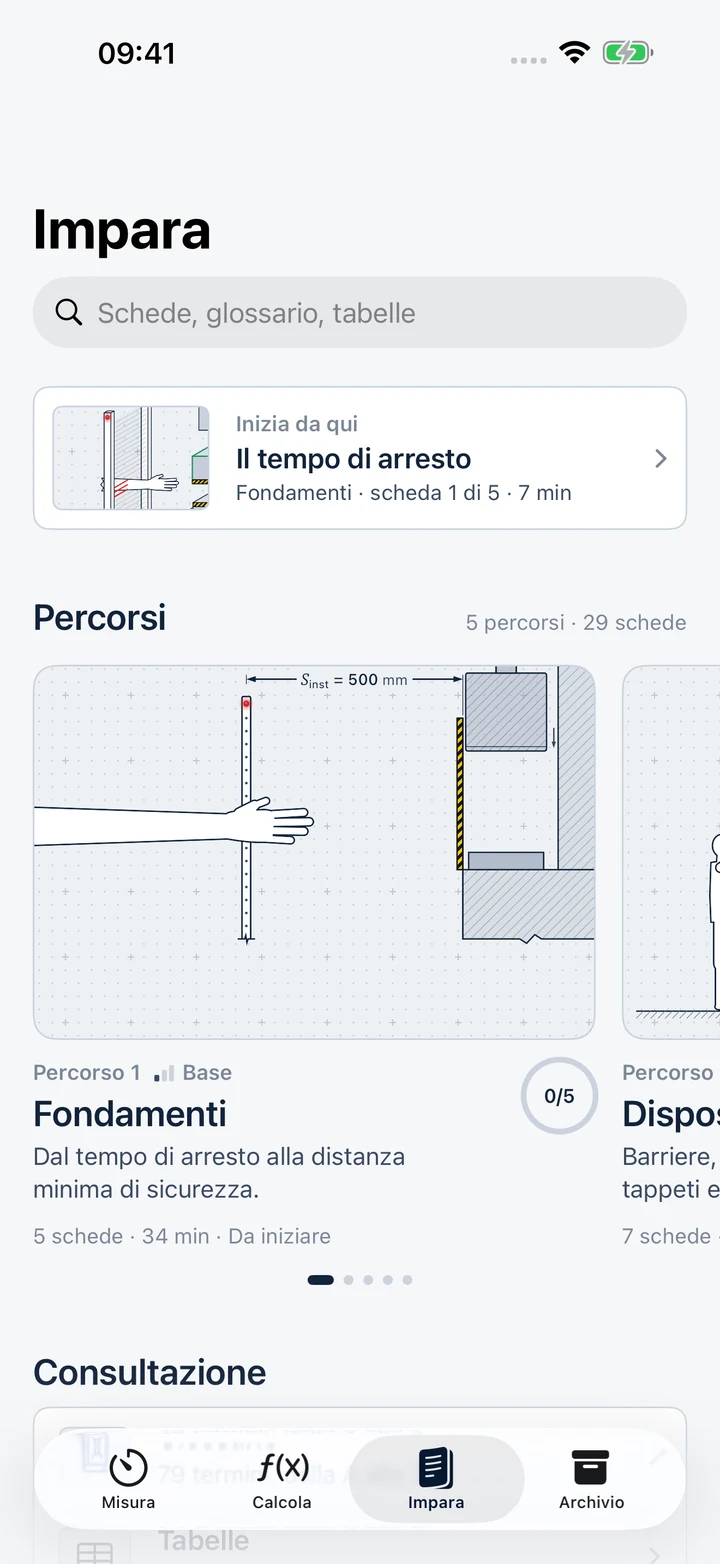
Learn

Understand the standard through technical diagrams.

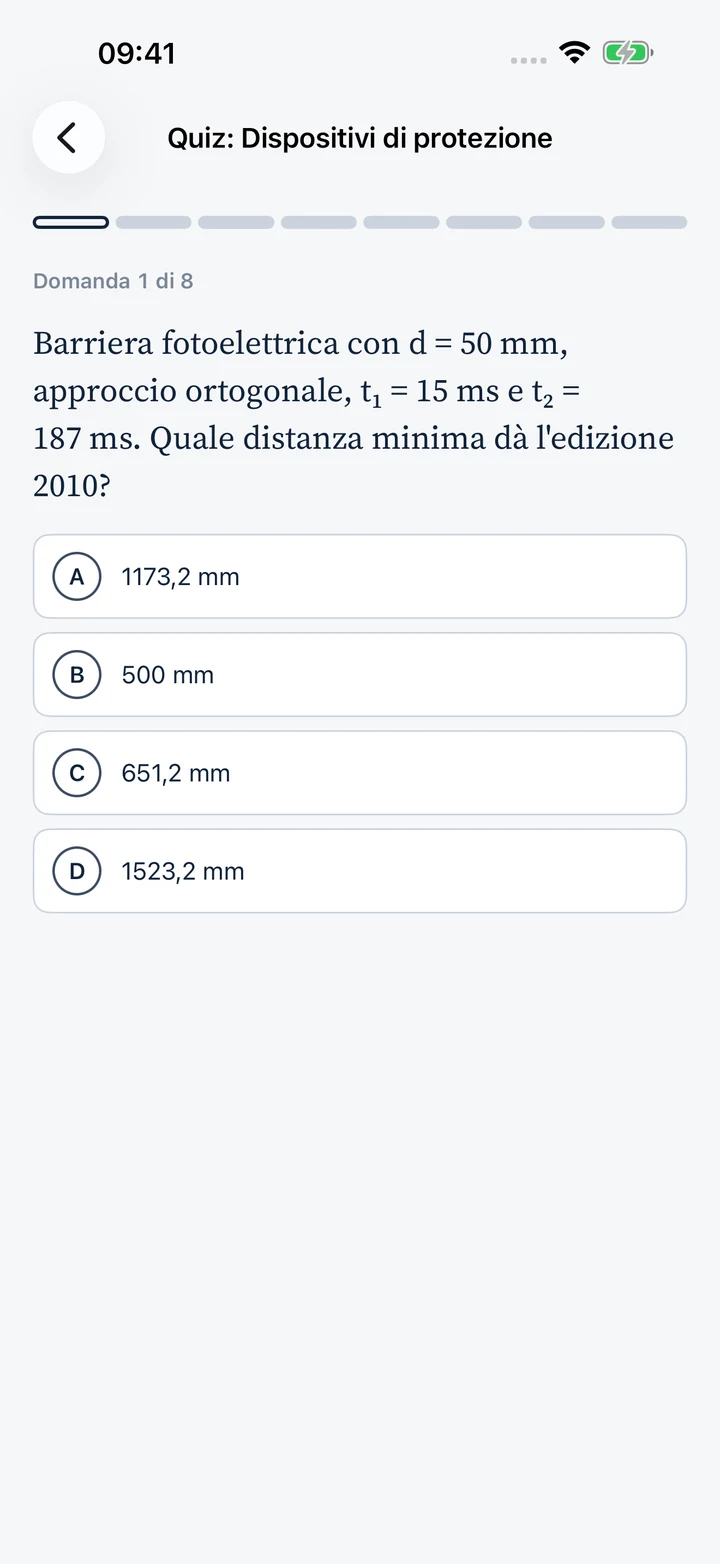
29 articles in 5 learning paths, 25 animated diagrams, a glossary and quizzes. Original learning content to support your work, not replace the applicable standards.

Basic
Foundations
5 articles
Intermediate
Protective devices
7 articles
Advanced
Measure the stopping time
8 articles
Intermediate
Regulatory framework
4 articles
Basic
In the field
5 articles

Reports and archive

Review the test. Keep the revisions.

  • Draft technical PDF with machine and device details, repetitions, frames, plots, uncertainty and calculations. Its result is a numerical comparison requiring professional verification.
  • Operator and declaration: the app records the declared details and the acknowledgement required for the report. It does not verify identity or apply a qualified professional signature.
  • Separate revisions: PDF updates retained as new revisions, without replacing the previous ones.
  • Printing and export: PDF, a ZIP package with documents and recordings, and JSON/CSV data. Single Report access or Unlimited is required; calculator PDFs are already included in Base.
  • Archive available for free to view for machines, devices, sessions and saved previews, even after the subscription expires.

Unlocking a report provides the software export feature. It does not include verification, approval or a signature by Carlo Tenca, RAVENG or CE4U.

Guide to reports and exports →

Integrity and date

Each file has a digest. Each timestamp has a status.

SHA-256 digests

They identify the files in the package and allow for integrity control. A local technical signature can protect the manifest: it does not equate to a qualified signature from a professional.

RFC 3161 timestamps

Requested for files specified by the workflow, including PDFs, manifests and original recordings. The app shows received timestamps and pending or retryable requests. Connectivity and provider availability are required.

Verifiable package

The package includes available evidence and verification instructions. A timestamp confirms a time reference for the digest, not measurement correctness or approval of the report.

Status, retries and demonstration documents · Data sent to providers

Who it is for

Professionals who install, inspect and take responsibility for machinery safety.

Installers and integrators

Photoelectric light curtains, pressure-sensitive mats and two-hand controls: data and calculations to support the technician's commissioning checks.

Maintenance technicians and technical offices

Periodic checks and comparisons over time: stopping time increases as the brake wears.

RSPP and consultants

Recordings, results and documented limitations for risk assessments and audits.

Experts and verifiers

Session data available for review, with declared uncertainty, event frames and file digests.

StopTime Seal: patent pending, application no. 102026000027877, UIBM, 25.09.2026PATENT PENDINGAPPLICATION NO. 102026000027877 · UIBM · 25.09.2026

Patent pending

The measurement method is patent pending.

Patent pending technology: industrial invention patent application no. 102026000027877, filed with the UIBM on 25 September 2026.

The patent application concerns the contactless measurement method. It does not cover the calculators or learning articles. Filing an application is not the grant of a patent.

Patent pending: Italian patent application No. 102026000027877, filed with UIBM on 25 September 2026.

Privacy

The videos from your workshop remain yours.

The analysis occurs on the iPhone, without a StopTime account. For timestamps, the app communicates file fingerprints and technical data, including the IP address, to Sectigo and FreeTSA. Apple handles the purchases.

On the deviceCapture, analysis, and reports remain on the iPhone.
No StopTime accountMeasurements do not require registration. Purchases are handled by Apple.
No tracking in appNo analytical or advertising SDK. Technical flows are described in the terms and conditions.
You control sharingA report comes out of the phone only when you decide.

Read the app privacy policy →

Availability and prices

Choose how to measure.
And which reports to export.

Learn and Archive viewing are free. Base includes Measure and Calculate without a limit on the number of measurements. Choose a Single Report or Unlimited for session report exports.

Learn and Archive

Free
Learning content and Archive viewing

29 articles, 25 diagrams, a glossary and quizzes. Saved machines, devices, sessions and report previews remain available to view without an active subscription.

Base · Measure and Calculate

3.99 € / month
39.90 € / year
14-day free trial for eligible users

Unlimited recording, import, analysis and calculations. Including PDF sheets of 10 calculators. Printing and exporting measurement reports are unlocked separately.

Automatically renews at the price for the selected period, including after an eligible free trial.

Download the app and choose Base

Single report

19.00 €
One-time purchase · one measurement session

Print and export PDF, ZIP, JSON and CSV for one session, including all repetitions. Reprints, later exports and revisions of the same session are included. Does not unlock Measure or Calculate.

Purchase in the app from the session. The price does not include professional review or certification.

Download the app to export a report

Unlimited

23.90 € / month
229.99 € / year
No limit on the number of measurements and reports

All Base features, plus printing and report exports for any session during the subscription. Sessions exported while it is active remain unlocked on the device. No free trial.

Automatic renewal at the price of the chosen period. To maintain the unlocks, you must retain the archive and associated access rights.

Download the app and choose Unlimited

One measurement means one session. Single Report access includes all the session's repetitions and revisions. A new session requires separate report access or active Unlimited. The price covers software export, not professional review or certification.

With Unlimited, export before expiry. Sessions exported during the subscription remain unlocked on the device for reprints and further exports if you retain the Archive and associated entitlements. A session never exported requires active Unlimited or Single Report access. Viewing the Archive and saved previews remains free.

Trial and renewal. Monthly and annual Base plans include a 14-day free trial for eligible users, once per subscription group under Apple's rules. Unlimited has no free trial. Subscriptions renew automatically; manage or cancel in Settings › [your name] › Subscriptions › StopTime. Apple advises cancelling a free trial at least 24 hours before it ends. Apple cancellation guide.

Italian App Store prices checked on 1 October 2026, including VAT. The price, duration, trial eligibility and terms shown by Apple before confirmation apply. The app is free to download, with in-app purchases.

Changing iPhone and restoration limits · Purchase terms
Warnings

StopTime provides a technical indication with declared uncertainty: it is not a calibrated measuring instrument and does not replace risk assessment or the technician's judgment. Always verify the harmonized edition of the applicable standard.

  • Stopping tests must be carried out by competent personnel under safe, representative conditions. Use the specified test piece, never a part of your body, to trigger a protective device.
  • The result applies to the machine, the device and the tested conditions: repeat the test after modifications, brake maintenance or cycle changes.

Frequently asked questions

Before trying it.

Do I need to connect anything to the machine or control panel?
StopTime analyses a recording without an electrical connection or a sensor mounted on the moving part. You need a compatible iPhone, a stable support and a safe test procedure carried out by competent personnel. The trigger reference must be consistent with the stopping chain.
How accurate is the measurement?
At 240 fps, one frame lasts 4.17 ms: this is not guaranteed measurement accuracy. StopTime displays the uncertainty budget and warnings. The illustrative example has measured t₂ of 187.5 ms and U of 23.3 ms, giving 210.8 ms for that repetition. The app is not a calibrated instrument and does not replace metrological validation of the method.
Which iPhones can I use?
iOS 17 or later is required. The capture at 240 fps depends on the formats offered by the device's camera; the app checks for availability. LiDAR is optional: the distance for acoustic correction can be manually entered. Full requirements.
Can I import a video and use two phones?
You can analyse an original video file that preserves the frame rate, timestamps and audio required by the trigger. Mode D · Two phones is not available in the current version. The available triggers are A · Acoustic, B · LED, B′ · Reflected LED and C · Detection-plane crossing. Guide to original videos.
Which standards and learning materials are included?
The app lets you select the 2010 or 2024 edition of EN ISO 13855 and shows the selected edition and warnings with the results. It includes 10 calculators and Learn, with 29 articles in 5 learning paths, 25 diagrams, a glossary, original summaries and quizzes. Normative tables are not distributed with the app: cases requiring them must be checked externally against the applicable standard. Learning content does not replace the official standards.
How much do measurements and reports cost?
Learn and Archive viewing are free. Base costs EUR 3.99/month or EUR 39.90/year and includes Measure, Calculate and calculator PDFs. Exporting a session report costs EUR 19.00 once, including reprints and revisions. Unlimited costs EUR 23.90/month or EUR 229.99/year and includes Base plus report exports for any session. These are Italian App Store prices. Prices and conditions.
What remains available after Unlimited expires?
The saved archive and previews remain accessible. Sessions exported while Unlimited was active remain unlocked on the device for subsequent exports, preserving data and access rights. The others require an active subscription or single unlock. Read the restore and backup limits.
Is the PDF a certified report or a report signed by RAVENG?
No. It is an unvalidated technical draft. Operator details, a use declaration, a technical integrity signature and a timestamp do not constitute professional approval of the measurement. A purchase does not include verification or a signature by Carlo Tenca, RAVENG or CE4U.
Where are videos, measurements and timestamps processed?
Analysis takes place locally and no StopTime account is required. Recordings and reports remain on the device, except for sharing and backups you choose. For timestamps, the app automatically sends SHA-256 digests and technical data, including the IP address, to Sectigo and FreeTSA; it does not send them the complete files. Apple handles purchases. Privacy policy.
Where can I download StopTime?
StopTime is available on the App Store for iPhone with iOS 17 or later. It is free to download, with in-app purchases. Learn and Archive viewing are free; Measure, Calculate and report exports follow the plans described here. No TestFlight invitation is required. This page describes the iPhone app. Download StopTime from App Store.

Available on App Store

StopTime on your iPhone.

Download the app and start with Learn, free of charge. For Measure and Calculate, choose Base or Unlimited. Before a field test, read the requirements, procedure and limitations of the method.

Download on the App Store Manual and support